


Who Lite - Video chat now
4.5636.00 Reviews
App Specs
- Version
- 1.0.164
- Updated On
- License
- Free
- Downloads
- 10,000,000+
- Developer
- Media Republic Apps
- Categories
- Social
- Platform
- Android
Screenshots


 Analysis by AppCompare
I tried Who Lite - Video chat now as a social app for meeting people through live conversation rather than simply scrolling through profiles. That difference matters. The appeal is immediate contact: you open the app, look for a person who seems available, and move toward a video chat instead of spending a long time polishing a profile or exchanging messages that may never go anywhere.
My first impression was that this is aimed at people who want a quick, informal way to connect. It is not the kind of social tool I would choose for organizing a group project, keeping up with close friends, or building a carefully managed professional network. Its place is more spontaneous, and the mature audience makes that especially important to understand before installing it. The app is free to download, although in-app purchases range from less than a dollar to nearly two hundred and forty dollars per item, so I would approach its paid elements carefully.
From opening the app to starting a conversation
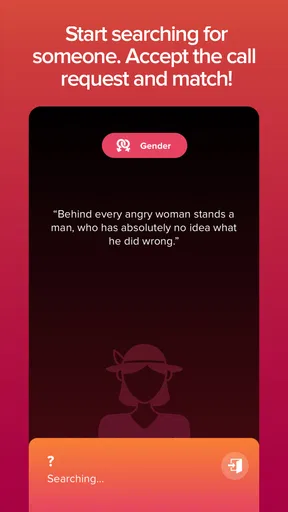
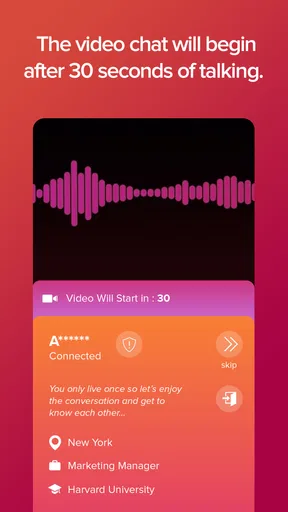
I’ll focus on the transition from opening Who Lite to beginning a live exchange, including how a clear goal and a simple opening question can make that first contact feel less awkward. That starting rhythm also sets up the next section’s closer look at what changes when several conversations happen in one session.
The starting condition: looking for a faster social experience
Who Lite comes from Media Republic Apps and sits in the social category. The store identifies it as suitable for mature users aged seventeen and above, which sets a different expectation from a general-purpose messaging app. I would not hand it to a younger teenager, and I would not treat the age label as a guarantee that every conversation will suit every adult. It is a reminder to use judgment from the first interaction.
The app makes the most sense when I have a little time and want human contact without committing to a long conversation in advance. That could mean winding down after work, looking for someone to chat with while traveling, or simply wanting to meet people outside my usual circle. The live video angle gives the experience more energy than text-only matching, but it also removes some of the distance that lets me think before replying.
That trade-off is central to the whole workflow. With a conventional messenger, I can write a message, edit it, wait, and decide whether I want to continue. With a live chat app, the handoff from discovery to conversation happens much sooner. I found that useful when I wanted a natural exchange, but less comfortable when I was not in the mood to be visible or respond quickly.
First steps and the importance of a clear boundary
My practical advice is to decide what I want from the session before I begin. “I want a short conversation” is a better starting point than opening the app with no limits at all. That small decision helps prevent the common social-app problem of drifting from one interaction to another without knowing whether the experience is actually enjoyable.
Worth Reading Before You Choose

EA SPORTS FC Mobile 26 Is a Bigger Football Game, but It Takes Time

Flipboard Shows What News Apps Must Do Beyond the Feed

Switching to Android Auto Means Rethinking Your Driving Routine

Google Calendar Makes a Crowded Week Easier to Manage

Ludo King Makes the Most of the Minutes Between Plans

Baby Panda World Brings Quick Play to Modern Phones, but Its Game Library Feels Busy
I would also prepare a neutral opening question rather than relying on an empty greeting. Asking about a hobby, a city, a favorite type of music, or what brought the person online gives the first exchange somewhere to go. It also helps reveal quickly whether the other person is interested in a genuine conversation. If the interaction feels forced immediately, I would end it rather than trying to rescue it.
Because video is more personal than text, I would check my surroundings before starting. A quiet room, a simple background, and headphones can make the conversation easier, but I would avoid showing documents, addresses, work screens, or anything else that reveals more than intended. The best way to use a live social app is to control what you share before another person asks for it.
Moving from discovery to live chat
The main appeal is the short distance between finding someone and speaking with them. Instead of treating every contact as a long-term connection, I approached each chat as a small social test: can we hold a comfortable conversation, do we have anything in common, and do I actually want to continue?
This makes Who Lite feel more immediate than many familiar alternatives. A standard dating-style service often emphasizes profiles, matching decisions, and written introductions. A messaging network usually works best when I already know the other person. A random video-chat service can be faster, but may feel less intentional. Who Lite occupies the space between those experiences, with the convenience of live contact and the uncertainty that comes with meeting someone quickly.
The useful consequence is that I can learn more from a short exchange than from a carefully written profile. Voice, timing, and conversational effort reveal things that text can hide. The less useful consequence is that I have less preparation time and less control over the tone of the interaction. Someone who prefers to build trust gradually may find the pace uncomfortable.
Managing the handoff between people
Every live conversation involves a handoff: I move from the app’s discovery experience to another person’s attention. That transition works best when both sides understand that a chat can end without drama. I tried to keep early conversations light and short, then decide whether there was a reason to continue. This is more efficient than giving personal details simply because the video connection has started.
If a conversation becomes awkward, I would not over-explain my exit. A brief goodbye is enough. If someone pressures me to continue, asks for sensitive information, or changes the subject toward money, private accounts, or off-platform contact too quickly, I would treat that as a clear reason to leave. The app’s social purpose does not remove the need for ordinary online caution.
There is another handoff to consider when I want to reconnect with someone. A pleasant chat does not automatically mean the person is trustworthy, compatible, or worth adding to my wider social life. I would keep the next step modest: another conversation inside the app, with no immediate sharing of personal contact details. That approach preserves the benefit of meeting someone new without turning one good interaction into an obligation.
A realistic evening workflow
Imagine I have finished dinner and want to talk to someone outside my normal routine. I open the app, set aside twenty or thirty minutes, and begin with a simple goal: have one or two decent conversations. I avoid treating every person as a potential close friend. Instead, I listen for basic compatibility, such as whether the other person asks questions, respects pauses, and keeps the exchange comfortable.
In the first chat, the conversation may end quickly. That is not necessarily a failure; live social apps depend on uneven chemistry. In the next interaction, I might find someone who shares an interest in films or travel. Rather than rushing to exchange personal details, I would keep the discussion focused on that shared topic and see whether the person remains respectful when the novelty fades.
At the end of the session, I would review the outcome honestly. Did I enjoy speaking with people, or did I spend most of the time skipping conversations? Did the video format make connection easier, or did I prefer writing? Those answers tell me more about whether the app suits me than the excitement of the first few minutes.
What the live format does well
For me, the strongest part is immediacy. A live conversation can break through the repetitive feeling of reading short bios and sending messages into silence. It is also useful for people who express themselves better through tone and conversation than through carefully composed text. If I want to know whether an interaction feels natural, video provides that information quickly.
The format can also reduce a particular kind of wasted effort. On ordinary social platforms, I may spend time responding to someone who appears engaging in writing but is unavailable, uninterested, or very different in conversation. Here, the transition to speaking happens earlier. That does not guarantee a good connection, but it makes compatibility easier to judge.
Another strength is flexibility. I can use it for a brief social break rather than planning a formal meeting. That makes it more approachable than services that expect a detailed profile or a long matching process. The experience feels closer to dropping into a conversation than managing a social identity.
Where the workflow becomes less comfortable
The same speed that makes the app interesting can also make it tiring. Live video demands attention, and repeated introductions can start to feel mechanical. If I am shy, distracted, or already socially drained, the app may create more pressure than enjoyment. Text messaging is better when I need time to think or when I want a record of what was said.
There is also a privacy cost to being visible. Even without sharing personal information, my face, voice, surroundings, and reactions communicate more than a written message does. I would use the app in a setting where I can end a chat comfortably, and I would avoid treating a friendly tone as proof of good intentions.
Paid elements are another point where the flow may break. The app is free, but the presence of purchases means I would not assume every part of the experience is equally available without spending. Since individual items can cost from $0.99 to $239.99, I would check what a purchase does, whether it is genuinely useful for my goal, and whether I can enjoy the core experience without it. I would never buy something merely because a conversation feels urgent or because I want to impress another user.
How it compares with familiar alternatives
Compared with a traditional messaging app, Who Lite is better for meeting unfamiliar people quickly and worse for controlled, private communication with people I already know. Compared with a profile-heavy dating service, it gives me faster feedback but less time to assess someone before contact. Compared with text-only social networks, it offers a stronger sense of presence while demanding more confidence and attention.
I would choose a normal messenger when the relationship already exists. I would choose a more structured matching service when compatibility, detailed profiles, and slower decisions matter most. I would choose Who Lite when spontaneity is the priority and I am comfortable with the uncertainty of live video. That distinction is more useful than calling one platform universally better than another.
Who should try it, and who should skip it
I think it is a good fit for adults who enjoy short conversations, want to meet people beyond their existing contacts, and do not mind being on camera. It may also suit someone who finds text-based introductions dull and prefers to judge chemistry through natural conversation. The free entry point makes it easy to test without committing to a subscription.
I would skip it if I dislike spontaneous video, need strong control over every interaction, or mainly want a private chat tool for friends and family. I would also avoid it if I am likely to spend impulsively on social interactions. The mature rating and live format call for a level of confidence and boundary-setting that not every user wants to maintain.
Practical habits that improve the experience
- Set a time limit before starting, so a casual session does not become an endless series of low-quality chats.
- Use a neutral background and remove visible personal information from the camera frame.
- Keep the first conversation general until the other person shows consistent respect.
- Leave quickly when the exchange becomes pressuring, uncomfortable, or focused on money.
- Test the free experience before considering any purchase, especially the higher-priced items.
These habits are not decorative advice; they change the result. Without them, the app can become a stream of interruptions. With them, I can treat each interaction as a controlled opportunity to meet someone, rather than handing the direction of the evening to strangers.
Performance expectations and ongoing use
Who Lite has been available since June 2020, and its current Android version is 1.0.164. It requires Android 8.0 or newer, so anyone using an older device should check compatibility before planning around it. The app has passed the point of being a brand-new experiment: it has more than ten million installs, a four-and-a-half average rating, and roughly thirty-five thousand ratings overall.
Those figures suggest that the concept has attracted a substantial audience, but they do not remove the personal question of fit. A large user base can make a live social app feel active, yet the quality of any individual conversation still depends on timing, behavior, and luck. I would judge it by the consistency of my own sessions rather than assuming popularity guarantees a good match.
One detail I appreciate is that the app’s identity is clear. It is not trying to replace every social tool on my phone. Its purpose is live connection, and that narrow focus makes the decision simple: if I want spontaneous video conversation, it is worth testing; if I want messaging, organization, or a quiet way to maintain existing relationships, another category of app will serve me better.
The result after using it
My overall result was mixed in a useful way. When I approached Who Lite with a specific goal, kept the first exchanges simple, and accepted that many chats would be brief, it delivered the kind of immediate social contact I was looking for. The video format made successful conversations feel more genuine than a chain of short messages, and it let me recognize compatibility early.
When I opened it without enough time, energy, or boundaries, the same design felt demanding. A live conversation cannot always wait while I think, and not every person I meet will share my expectations. The app rewards openness, but it also requires selectiveness. That is the main lesson I took from the workflow: the user has to manage the pace.
I would recommend it to an adult friend who specifically wants to meet people through live video and understands the privacy and spending considerations. I would describe it as a focused social experiment rather than an all-purpose community. The free download makes trying it straightforward, but I would keep purchases optional and deliberate.
In the end, Who Lite - Video chat now works best when I use it as a short, bounded way to discover conversational chemistry. It is less convincing as a replacement for established messaging or slower relationship-building services. If that distinction matches what you want, the app can turn an ordinary free evening into a few memorable conversations. If you prefer predictability, privacy, or more time to decide, I would choose a calmer alternative instead.
Pros
- Lightweight app that uses less storage and mobile data
- Quick sign-up makes it easy to start meeting people
- Video and text chat options support different communication styles
- Simple interface is suitable for users with older smartphones
- Useful discovery tools help you find new chat partners quickly
Cons
- The user base may be smaller than on larger social apps
- Video quality can vary noticeably with weaker connections
- Some features may require in-app purchases or premium access
- Unexpected messages or profiles can affect the overall experience
- Privacy settings may need careful adjustment before chatting
FAQs for Who Lite - Video chat now
What is Who Lite - Video chat now, and how does it work?
Who Lite - Video chat now is a social video-chat application designed for meeting and talking with people through live video interactions. After creating a profile, you can browse available users, start conversations, and use video or messaging features depending on the options provided in the app. The experience is centered on quick, casual connections rather than long-form social networking.
Is Who Lite - Video chat now free to download and use?
The application may be available to download at no initial cost, but some communication tools, virtual items, profile features, or extended usage may require in-app purchases or a subscription. Before using paid functions, review the pricing information shown in the app store and inside the application. Availability of features and prices can also vary by country, device, and account.
Is Who Lite - Video chat now safe for meeting strangers online?
As with any random or social video-chat platform, users should be careful when interacting with people they do not know. Avoid sharing your home address, phone number, passwords, financial information, or private documents. Use the blocking and reporting tools when available, and end conversations that make you uncomfortable. Parents should also consider whether the app is appropriate for younger users.
Does Who Lite - Video chat now require a camera, microphone, or location access?
Video conversations normally require access to your device’s camera and microphone, while certain discovery or matching features may request additional permissions. You can review and change these permissions through your Android or iOS settings. If you deny camera or microphone access, messaging or browsing may still work, but video-chat functions could be limited or unavailable.
What should I check before creating an account on Who Lite - Video chat now?
Before signing up, read the app’s privacy policy, community guidelines, age requirements, and terms of service. Check how your profile information, photos, messages, and video interactions may be handled, and confirm whether the service offers account deletion. It is also worth reviewing notification settings and purchase controls so the app matches your privacy, safety, and spending preferences.


